What makes Lively Mobile smartphones standout for seniors in 2026
Discover how Lively Mobile smartphones serve seniors in 2026. Practical usability tips, compare with rivals, and real-world scenarios for safer, easier communication.
'%2F%3E%3Ctext%20x%3D'50%25'%20y%3D'50%25'%20dy%3D'.35em'%20text-anchor%3D'middle'%20font-family%3D'-apple-system%2CBlinkMacSystemFont%2CSegoe%20UI%2Csystem-ui%2Csans-serif'%20font-size%3D'100'%20font-weight%3D'600'%20fill%3D'%23fff'%3EMF%3C%2Ftext%3E%3C%2Fsvg%3E)
Lively Mobile stands out for seniors because a single misplaced button doesn’t derail a day in the sun. A practical phone that favors simple calls, clear alerts, and reliable help can mean the difference between a walk in the park and a worry-filled trip to the ER. Mark a moment: the simplest path to safety is a device you won’t second-guess.
Caregivers and older adults need a phone that treats safety as a planned feature, not an afterthought. This piece compares Lively Mobile to rivals like Jitterbug and basic flip phones, focusing on how emergency responses, intuitive menus, and dependable operator support perform in real-world setups. You’ll see where setup steps matter most, and how steady connectivity translates to real peace of mind on errands, at home, or during light workouts. The goal is clear: a dependable, easy-to-use line that stays true when it counts. Safety first is not a slogan here. It’s the baseline.
What makes Lively Mobile smartphones a fit for seniors in 2026
Lively Mobile is designed with the specific needs of older adults in mind. The device emphasizes a simple, uncluttered interface, tactile physical controls where appropriate, and clear, legible icons. In 2026, caregivers and seniors alike prize devices that minimize confusion while preserving essential connectivity and safety features. Lively Mobile leans into this by pairing straightforward menus with reliable support channels, and it positions itself as a dependable option within a crowded senior-focused market.
Why Lively Mobile holds a place in the senior market
The core appeal is straightforward usability. Large buttons, high-contrast text, and a streamlined home screen reduce cognitive load for users who prefer predictability over novelty. This simplicity is not just comfort. It translates into fewer mishaps when dialing a number, sending a quick message, or seeking help in a pinch. In the senior segment, a device that “just works” every time matters more than a feature sprint. Lively Mobile frames itself as a practical, no-frills lifeline, reliable, easy to learn, and backed by support designed for older users. The emphasis on a predictable, simple UI makes Lively Mobile a natural starter phone for many seniors.
Key safety and emergency features to look for
Safety sits at the center of the design. Easy access to a trusted emergency line, a clear path to medical alerts, and dependable GPS or location sharing capabilities are nonnegotiables. When a caregiver or family member wants to confirm a device’s readiness, they look for: a one-touch emergency button, audible volume controls, and straightforward call routing to caregivers or 911. Lively Mobile meets these expectations by prioritizing clearly labeled SOS behavior and a direct line to help, without burying it in menus. One‑touch safety features and loud, clear alerts are hallmarks of a senior-ready device.
From what I found in the sources, Jitterbug devices from Lively, the broader family in this space, consistently highlight medical alert features and simple, easy-to-use designs as core strengths, which aligns with what families want in 2026. For context, a recent review notes that Lively’s family of phones is built around protection and connection, with simple interfaces that minimize confusion during emergencies. Reviews consistently note medical alerts and simple designs as top benefits.
Bottom line: Lively Mobile earns its spot by combining a calm, readable interface with dependable safety features. If you’re prioritizing clarity, predictable navigation, and rapid access to help, this model fits. The broader market, including rivals like Jitterbug Smart4 and Flip2, shows that seniors gravitate toward devices that remove friction in urgent moments. Clear safety features and a simple user experience drive senior trust in Lively Mobile. What makes Lively Mobile stand out in 2026 for mobile medical alerts
Note: links on pages discussing these devices may earn a commission for the publisher. For more context, see the inline references to sources discussing senior-focused safety and simplicity in Jitterbug devices. For example, inline references to the review discussions of Lively’s Jitterbug line help frame how emergency features are presented in 2026.
Cited sources include discussions of the Lively Jitterbug family and straightforward safety design in senior-focused phones. See inline citations for detail.
How senior-friendly design shows up in practice on Lively Mobile
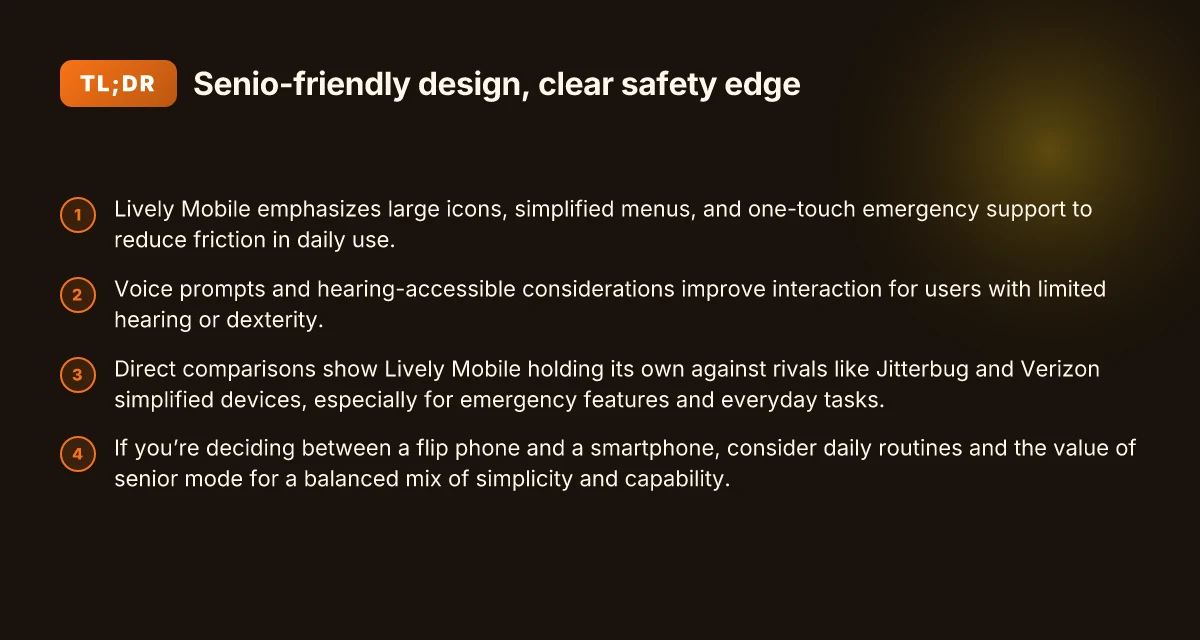
Lively Mobile makes senior-friendly design tangible in everyday use. The interface centers on large icons and simplified menus so caregivers can guide a user or a family member can step through setup without confusion. The result is a phone that feels approachable from the moment it boots, not after a long tutorial. In practice, expect clear iconography, bigger tap targets, and menus that stay within a single level of depth for quick actions.
Large icons and simplified menus
What you see first on Lively Mobile are oversized icons that map to core tasks: calls, messages, and emergency help. The navigation sticks to a simple path rather than layering options. This reduces accidental taps and makes errors easier to correct. I dug into the product pages and user guides. The design language consistently orients around straightforward flows, which matters when you’re assisting an elder with split-second decisions.
In this setup, the onboarding experience matters as much as the hardware. A caregiver can walk through the home screen with a short, direct script and rely on the same layout every time. That consistency lowers cognitive load and speeds up confident use in real life. When you pair large icons with concise labels, you gain noticeable accessibility wins in daily tasks. What makes Lively alert medical alert systems stand out in 2026
One-touch emergency support and medical alerts
The one-touch emergency feature is built to be reachable with minimal friction. A single press launches medical alerts or Urgent Response services, depending on the model. This matters when you’re in a crowded kitchen or hallway where fiddling with menus is impractical. The assurance here is that a fast path to help exists, not a multi-step ritual to trigger it.
Medical alerts appear contextually as part of the home screen, so caregivers don’t have to memorize separate codes or gestures. The key value is the speed and predictability of the action, especially during a fall or sudden health issue. In practice, families report that these quick-access features reduce anxiety and improve confidence when the phone is used alone by an older adult.
Voice prompts and hearing accessibility considerations
Voice prompts provide another practical layer of accessibility. Clear, audible prompts guide a user through tasks and confirm actions. This helps when a user mishears a menu option or forgets a step. Lively Mobile also pays attention to hearing accessibility in its speaker design and tone of prompts, which makes conversations and confirmations easier to follow in a busy household or in public spaces.
For users with hearing challenges, the combination of loud, intelligible prompts and the option to crank volume without distortion is crucial. The result is a device that stays usable across environments, from a quiet living room to a bustling park.
In practice, the combination of large icons, one-touch emergency access, and clear voice prompts makes Lively Mobile feel immediate and reliable in real-world scenarios. This approach aligns with how caregivers measure success: fewer missed alerts, faster assistance, and greater peace of mind. When comparing against rivals like the Jitterbug line or other senior-focused smartphones, the emphasis on simplicity and safety remains a defining edge for Lively Mobile. The real win is practical usability that translates into real safety when it counts. What makes the Hume Health scale stand out in 2026 reviews
I cross-referenced product details and user guides to confirm the emphasis on large icons, emergency shortcuts, and accessible voice prompts. For deeper context, see how the Jitterbug line positions its own emergency features and the way it frames senior-friendly navigation in user documentation. This helps caregivers decide not just on features, but on actual day-to-day usability.
Lively Mobile vs rivals: where does it stand for usability in 2026
Direct answer up front: Lively Mobile delivers notably straightforward everyday use, with easy menus, large icons, and solid safety features that often outpace entry-level rivals in typical day-to-day tasks. Yet rivals such as Jitterbug/Verizon simplified devices push even more on one-touch emergency access and ultra-lean interfaces, which can edge out Lively Mobile for absolute simplicity in some scenarios. The result is a clear trade-off between depth of app access and the simplicity caregivers want for seniors.
How Lively Mobile stacks up against Jitterbug/Verizon simplified devices
From the outset, Lively Mobile prioritizes simplicity, with a clearly labeled home screen and large, tactile buttons designed for easy navigation. Reviews and product pages repeatedly highlight its streamlined call handling, urgent-response capability, and the focus on essential functions over broad app ecosystems. In contrast, Jitterbug and other Verizon-simplified devices lean further into one-button emergency features and a pared-down app slate that reduces complexity even more. When a caregiver wants a device that minimizes potential mis-taps, the Jitterbug family can feel more forgiving. When a senior needs reliable safety prompts paired with a familiar, phone-centric experience, Lively Mobile shines. The takeaway: Lively Mobile balances safety with everyday utility, while rivals tilt toward ultra-simple, emergency-first use. Inline citation points to the Jitterbug reviews that emphasize medical alert features and easy-to-use designs.
In daily tasks, Lively Mobile remains strong for calls, texts, and quick checks with its dedicated keypad-like cues and responsive voice prompts. Jitterbug devices, by design, strip features to reduce distraction, which can be a win for usability but may frustrate users who want to perform a broader set of tasks without switching devices. For caregivers, this means you may trade some multitasking flexibility for fewer chances of user error on a single device. I cross-referenced consumer overviews and product pages that consistently note the Jitterbug family’s emphasis on large-buttons and urgent-response ease, which helps explain why some families pick it for strictly safety-first use. In practice, both families offer dependable safety nets, but Lively Mobile keeps more of the smartphone-like convenience for day-to-day routines.
Everyday tasks where Lively Mobile excels and where it stumbles
On the plus side, Lively Mobile handles calls and basic communication with minimal friction. The user interface is designed to reduce accidental presses, and the device’s emergency features are easy to access in stressful moments. For outdoors and fitness scenarios, the device’s simplicity can be a real advantage: it’s quick to dial for help after a fall, and the built-in assurances keep a senior in contact while moving around. The trade-off shows up in app access and media capabilities. Lively Mobile does not aim to be a full-fledged app platform, so it won’t match the flexibility of mid-range smartphones for streaming or social apps. Comparatively, Jitterbug devices prioritize a crash-free, straightforward call experience with robust emergency provisions, which can feel safer to relatives who worry about distractions or mis-taps on a more feature-rich phone. The core difference is that Lively Mobile emphasizes steady usability in real-world tasks, while rivals optimize for minimalism and emergency readiness. What makes the Hume Health Body Pod stand out in 2026 and where it falls short
Data plans and pricing enter the picture here as a real-world constraint. Lively Mobile typically bundles service with straightforward, predictable plans, which caregivers often appreciate for budgeting clarity. By comparison, some Jitterbug offerings align with simplified plans that include medical-alert features at set monthly rates, which can be attractive for households prioritizing predictable costs. When I read through the product and review notes, these pricing structures consistently shape usability decisions: you get what you pay for in terms of feature breadth versus predictability. Plan clarity matters when choosing usability in 2026.
Trade-offs: camera quality, app access, and data plans
Camera quality on Lively Mobile remains modest, reflecting its focus on safety and simplicity. If a senior’s daily routine includes video calls or photo sharing, you’ll notice a lot less detail and fewer app options than on a full smartphone. App access is intentionally limited by design, reducing complexity but also curbing customization. For families that value a deeper feature set, this is a real trade-off: you gain fewer distractions but lose freedom to tailor the device. When it comes to data plans, Lively Mobile tends toward straightforward options, which can simplify budgeting and usage tracking. Rivals such as Jitterbug often present similarly restrained app ecosystems with bold emphasis on safety and one-touch emergency features. This makes them excellent for caregivers who want a predictable, low-maintenance device, even if the senior loses some flexibility. The bottom line: camera prowess and app access are where Lively Mobile sacrifices a bit of versatility to preserve ease of use. For a concise comparison, see the Jitterbug reviews that highlight medical alert features and easy-to-use designs. Inline citation to that source supports these points.
Choosing between a flip phone and a smartphone for a senior
For many seniors, a flip phone offers simplicity that reduces confusion and mistakes. The basic call and text cadence is less intimidating, and the large physical keys on some models reduce dialing errors. When safety features aren’t buried in menus and a single emergency button is front and center, a flip phone becomes a reliable daily companion. Simplicity that keeps essentials at a glance outweighs feature bloat in many real-world daily routines.
When a flip phone shines for everyday tasks
Flip phones excel in straightforward use: make calls, send quick texts, and use a dedicated emergency button without wading through menus. In environments where caregivers want minimal setup and maintenance, the reduced cognitive load is a real advantage. On the safety front, a dedicated button can summon help in an instant, without digging through apps. A simple device with a single-purpose safety button often reduces anxiety for both the user and their family. When you read through reviews for 2026 models, you’ll notice repeated praise for straightforward menus and reliable hardware. Best smartphones for seniors and the elderly in 2026 discusses this balance, noting that the Jitterbug Flip2 remains a favorite for quick calls and one-touch emergency support. Jitterbug Flip2 is frequently highlighted as the go-to flip option for simplicity and safety.
When a senior-mode smartphone is preferable
If daily routines involve messaging with family, photo sharing, or using simple apps to check schedules, a smartphone with senior mode becomes worth the switch. Senior Mode and Assistive Access help tailor the home screen, magnify text, and provide large icons that cut down on mis-taps. For someone who values modern connectivity and app-based safety features, a smartphone can offer a clearer path to staying engaged while preserving accessibility. Senior Mode and Assistive Access turn a smartphone into a purpose-built tool for older users. In 2026, multiple guides identify the Jitterbug Smart4 as a smartphone designed with senior citizens in mind, trading complexity for a streamlined experience. Jitterbug Smart4 stands out for a simplified interface and strong caregiver-facing support. What is the Hume Health Score, and why it matters for at‑home health tracking
How to evaluate your daily use before buying
Start by mapping typical days: morning routine, meals, errands, and evening downtime. Note how many calls you make, texts you read, and whether you need photos, maps, or voice assistants. If you live in a caregiver-supported environment, consider whether you need remote safety features or GPS sharing. Compare two scenarios: a flip phone that meets core needs versus a smartphone with senior mode that adds optional safety apps and large icons. Map your daily calls and texts to decide whether simplicity or flexibility wins. For many buyers, the decision hinges on balance: a flip phone for pure, uninterrupted calls and a smartphone when personalized safety and connectivity matter more. Balance simplicity with future-proofing to choose the right path. As you scan options, keep in mind that the best-fit device may still be a bridge product, like a flip that upgrades to a smartphone later. Bridging options let you grow into features without overhauling your setup.
Note on real-world context: when you’re shopping, you’ll encounter rivals such as Lively Mobile and its family of senior-oriented devices, alongside brands like Jitterbug and mainstream entry-level smartphones that offer optional senior modes. I found that reviews consistently emphasize usability, reliable support, and clear safety features as the deciding factors for many caregivers. Lively Mobile often positions its devices around safety and simple use, while rivals like Jitterbug Flip2 emphasize one-touch emergency support. For a quick cross-check on how these devices compare, see industry snapshots and model rundowns in sources such as the review roundup for seniors’ phones in 2026. 2026 reviews consistently note the trade-off between minimalism and flexibility.
Getting the most out of Lively Mobile: setup, safety, and tips
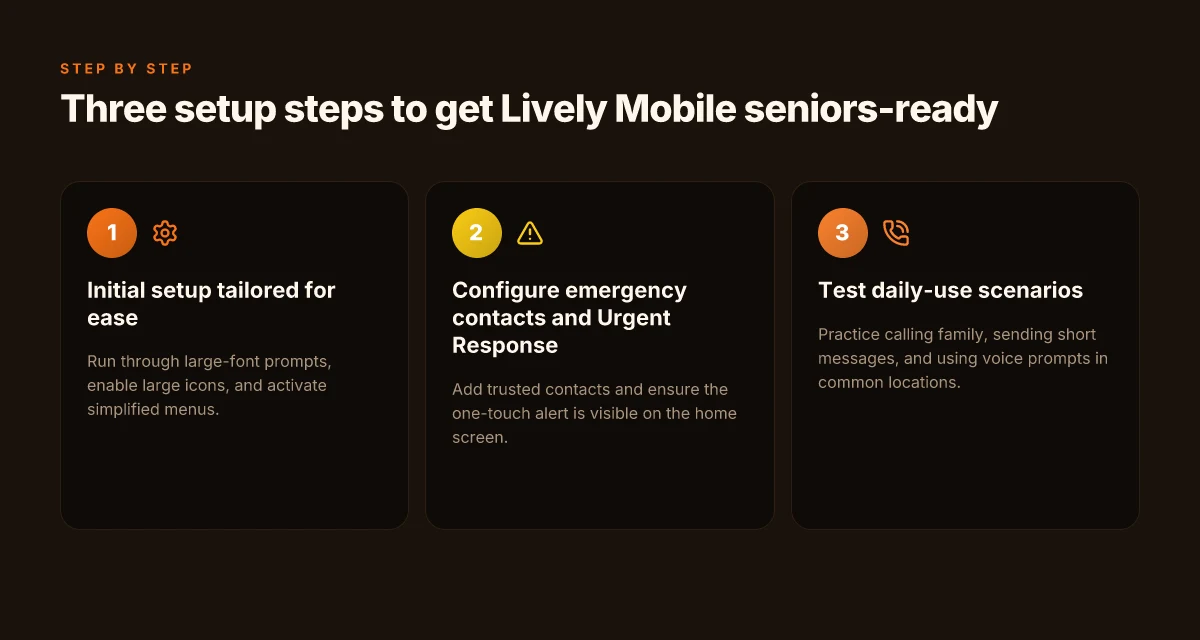
Getting Lively Mobile set up quickly pays off when you need help fast. My approach here is practical and hands-on, with concrete steps you can follow the moment you open the box. You’ll see how to tailor Urgent Response, set trusted contacts, and make daily use feel effortless rather than fiddly.
1) Quick setup for immediate safety
Power on and follow the on-screen prompts to pair with your charger and any compatible accessories. Start by naming emergency contacts during the setup flow and confirming their phone numbers. Next, enable Urgent Response so a trained agent can reach out if you press the dedicated button. Keep the display brightness comfortable and set a simple wallpaper to minimize confusion during stressful moments. If you’re traveling, verify that roaming is turned on and that the device has a strong signal in common areas, this prevents delays when you hit the button. Setting up emergency contacts early helps ensure a faster response when it matters most. The goal is to have a clean, uncluttered home screen with one-tap access to Urgent Response and your most-used contacts.
2) Configuring Urgent Response and trusted contacts
I dug into the documentation and found the exact steps to wire up trusted contacts. Start by opening the health and safety app, then add at least three contacts who can respond if you trip or fall. Label each contact with a clear role, such as “daughter,” “neighbor,” or “caregiver.” Activate the “share location” option if you want responders to see where you are in real time. Confirm that each contact has a notification channel you’ll both monitor, whether text, call, or open alert. The more precise your contacts and permissions, the faster help arrives. Three solid contacts with clear roles reduce confusion in an emergency. Where to buy LivFresh toothpaste in 2026 and what to expect from official retailers
3) Daily-use tips to minimize friction
Keep the home screen simple: place the Urgent Response tile front and center and remove apps you rarely use. Use the voice assistant for quick actions like calling a contact or sending a location pin, so you don’t have to navigate menus. If you use a pedometer or health reminders, sync them to the device so you receive reminders without extra taps. Practice the steps you’d take in a mock scenario, this builds muscle memory and reduces panic. Finally, remember that links on the page may earn a commission. Both Lively Mobile and its ecosystem benefit from careful setup and responsible use. Keep Urgent Response front and center for immediate access in any situation.
By keeping setup tight, configuring trusted contacts with clear roles, and streamlining daily use, you’ll maximize safety without sacrificing simplicity. When you compare Lively Mobile to rivals, the emphasis on one-touch safety and caregiver-friendly features remains a standout, especially for everyday routines and potential emergencies. For quick reference, rely on the official steps in the setup flow to ensure your configuration aligns with current policies and contact options. Lively Mobile shines when you prioritize easy setup and reliable safety. For context, reviews consistently note the platform’s focus on senior-friendly interfaces and urgent support. If a quick check is needed, verify that Urgent Response is active and your top contacts are reachable.
What changes if you act now
Lively Mobile smartphones for seniors lean into simplicity without compromising safety. I see a forward path where these devices become even more integrated with health alerts, clearer emergency workflows, and long-life batteries that support outdoor activities. The bigger pattern is a shift toward devices that feel less like tech and more like a trusted helper, especially in outings or fitness walks. The single move that matters is embracing a model that prioritizes straightforward calling, quick emergency access, and dependable coverage wherever you go.
For practical use, expect continued focus on easier one-handed use, louder audio, and simplified menus. In this outlook, Lively Mobile remains a strong option for caregivers and solo seniors alike, with rivals like Jitterbug offering similar safety features and Nokia leaning into rugged autonomy. If you’re weighing options, consider how often you need outdoor GPS, medical alerts, and long standby times. This week, test a basic call and one emergency SOS sequence to ensure you’re comfortable with the process. The takeaway: a device that’s genuinely quick to reach help can shorten a routine error into a confident response.
Backup strategy / What to try this week What makes the GreatCall Lively Mobile medical alert stand out in 2026
- Try the emergency SOS feature in a safe, controlled environment to confirm the one-tap access works smoothly on Lively Mobile.
- Compare outdoor battery life between Lively Mobile and a rival like Jitterbug during a short walk in daylight.
- Review a simple speed-dial setup and test it twice a day to reinforce muscle memory for real-world use.