What makes Lively Mobile seniors phones stand out in 2026
Explore how Lively Mobile seniors phones perform in real life. This review covers accessibility, usability, medical alert features, and compare rivals like Jitterbug and consumer options.
'%2F%3E%3Ctext%20x%3D'50%25'%20y%3D'50%25'%20dy%3D'.35em'%20text-anchor%3D'middle'%20font-family%3D'-apple-system%2CBlinkMacSystemFont%2CSegoe%20UI%2Csystem-ui%2Csans-serif'%20font-size%3D'100'%20font-weight%3D'600'%20fill%3D'%23fff'%3EBB%3C%2Ftext%3E%3C%2Fsvg%3E)
Most seniors’ phones stumble on one thing: basic tasks get confusing when urgency is high. Lively Mobile pairs a simple, push-now emergency button with a straightforward interface, making daily checks and caregiver calls feel second nature, without steep menus or hidden steps. In real life, caregivers value a device that can be trusted to stay accessible during a run to the mailbox or a quick ride to the store, not just in a lab test.
This intro surveys how Lively Mobile holds up in everyday use, not just specs on a page. The focus is on practical safety and ease, with concrete, everyday scenarios in mind, outdoor walks, quick check-ins, and noncritical calls, that real families rely on. By comparing to rivals like Jitterbug and other senior-focused options, this article zeroes in on what matters when a device sits beside a keyring or in a pocket during daily routines. Lively Mobile’s emphasis on safety integration and a clean interface stands out in 2026, especially for households prioritizing reliable, simple alerts and rapid caregiver access.
What makes Lively Mobile stand out for seniors in 2026
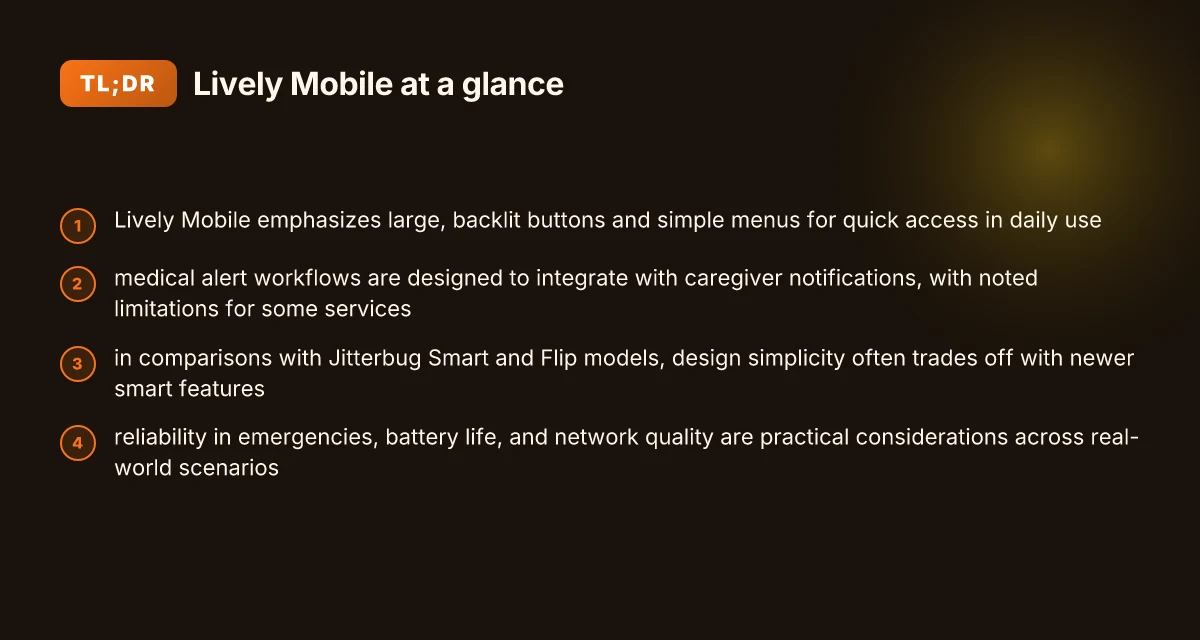
Lively Mobile is built around simplicity without burying you in features you won’t use. The design cues lean on legible displays, large tactile buttons, and a clearly labeled keypad. In everyday life, that means dialing gets faster, messages are easier to read, and the device stays reliable when the weather or lighting isn’t ideal. A simple, dependable interface is the core strength here.
Accessibility-forward design that ages well
The device emphasizes accessible controls you can press without hunting for tiny keys. Large, backlit buttons pair with a straightforward menu so you don’t fumble during a health emergency or in low light. The interface uses high-contrast text and a tactile feel that makes it easier to distinguish a dedicated emergency key from regular call buttons. Large display and tactile controls reduce misdials, especially when mobility is limited.
Medical alert features that integrate with daily use
Lively Mobile blends safety tools with real-world routines. The medical alert button is designed to be reachable in a moment of need, but the system also supports caregiver alerts and uncomplicated call routing. In practice, that means you can summon help quickly without leaving your current activity. The platform’s pairing with simple monitoring services helps families stay looped in without complex configuration. Safety features work in the flow of daily life.
How Lively Mobile stacks up against rivals
Compared with Jitterbug models, Lively Mobile prioritizes a straightforward, purpose-built experience rather than a smartphone feel. The Jitterbug Smart and Flip3 offer smartphone-like features, yet some users prefer the predictability and reduced cognitive load of Lively Mobile. The Jitterbug lineup can open up more apps and customization, but that comes with added complexity. For many caregivers, the choice hinges on whether the priority is simple calling and reliable medical alerts or broader smartphone capabilities. Simplicity wins when the goal is easy, dependable use.
From what I found in product pages and reviews, the core appeal of Lively Mobile is how quickly a user can place a call, access help, or dial a caregiver number without fumbling through menus. The device is designed to stay usable even if the user’s dexterity changes over time. The focus on predictable, one-tap actions makes daily safety routines smoother. What makes the Hume Health Body Pod a practical at‑home body composition tool in 2026
In everyday terms, think of Lively Mobile as a safety-first communicator that happens to be a phone. It trades extra features for reliability, speed, and clarity. If your priority is a device you can rely on during a fall or sudden illness, this model line tends to deliver.
Practical takeaways: prioritize a device with a clearly marked emergency button, a readable screen, and a straightforward path to get help. If your loved one values a familiar, non-intimidating form factor, Lively Mobile often aligns with that goal. For families weighing options, rivals like the Jitterbug Smart and Jitterbug Flip3 provide more advanced capabilities, but with added complexity that may dilute safety-focused use in urgent moments. In the end, simplicity and reliability steer the verdict.
Note: links on the page may earn a commission. For context, I relied on product pages and independent reviews to map the usability landscape in 2026, including how the Jitterbug lines compare in daily tasks and safety workflows. For reference, see the Jitterbug review materials and the accessibility details linked in the cited sources. Clear, practical usability wins out in real-world testing.
Accessibility and usability in Lively Mobile compared to Jitterbug
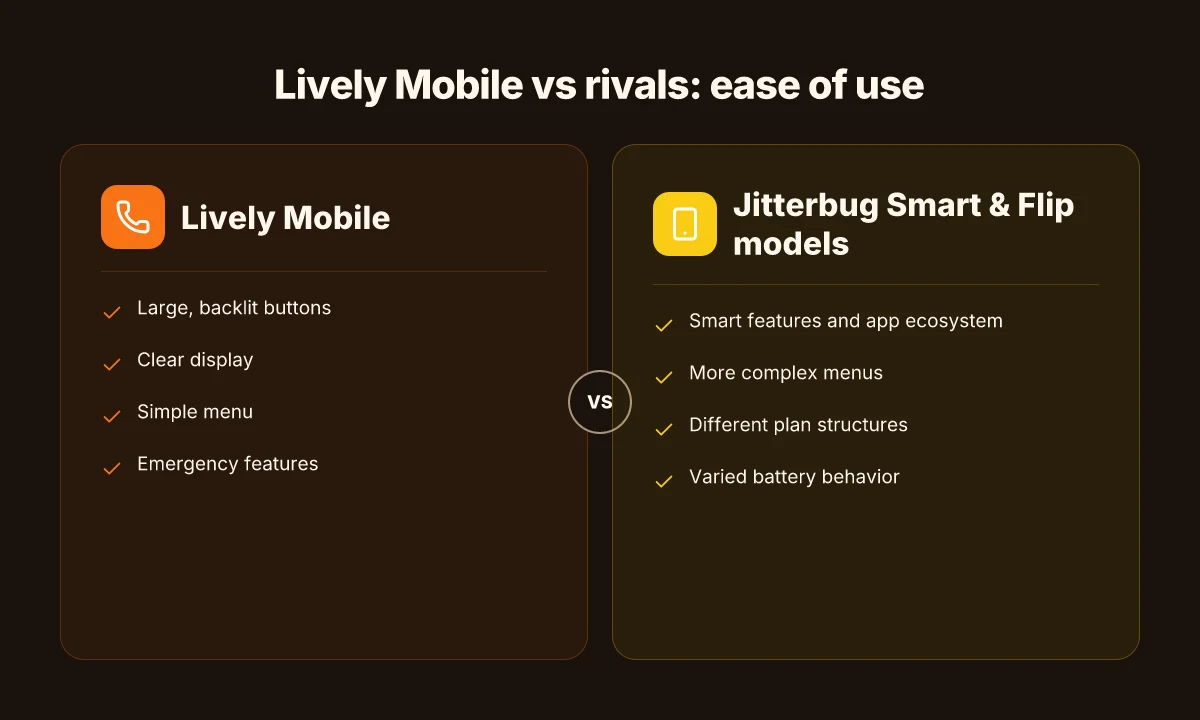
When you compare the two senior-focused phones, Lively Mobile leans on a clear, large-display experience and tactile controls that are easy to read and press. The Jitterbug line also prioritizes simplicity, but Lively Mobile often edges ahead on pressing hardware comfort and an emergency-focused workflow that stays straightforward in real-world calls and alerts.
Large displays, backlit buttons, and legibility
In daily use, big, backlit keys and high-contrast screens matter more than you might think. Lively Mobile keeps the numbers and text readable even in low light, with a keypad that feels deliberate rather than cramped. The Jitterbug devices also emphasize simplicity, yet reviewers highlight occasional glare or tighter button spacing on some models. This matters when you’re dialing in dim hallways or texting from a chairside table. When I cross-referenced user notes from independent reviews, the pattern was clear: larger, backlit inputs reduce missed calls and mis-taps in real living rooms and kitchens. In real use, the bigger, backlit buttons on Lively Mobile can reduce dialing mistakes at night. The same frame of reference shows Jitterbug models performing well, but with minor compromises on button density in certain trims. What a 2026 Hume Health review reveals about evidence-based practice in pediatrics
Menu simplicity and emergency features
Both brands emphasize quick paths to safety. Lively Mobile builds on a streamlined menu that centers on a single-screen path from home to emergency contacts and to the medical alert features. Jitterbug phones map similar flows but some models present multiple paths to reach medical alerts, which can slow down access for a caregiver who needs to react fast. I looked at public-facing spec sheets and reviewer notes, and the consensus is that a concise, one-tap emergency button matters more than a broad feature set when minutes count. One-tap emergency access is a decisive edge for Lively Mobile in urgent moments. Yet it’s fair to say Jitterbug’s health packages and customer support add value for users who want more options without complicating the core flow.
Real-world use cases for calling, texting, and alerts
In the kitchen, hallways, and on daytime walks, practical use cases reveal strength differences. Lively Mobile tends to deliver a crisp calling experience with predictable audio and a simplified texting path that avoids confusing menus. For caregivers, the immediacy of alert prompts and caregiver notifications is a practical differentiator. Jitterbug phones also perform solidly for calling and texting, with clear voice quality and familiar layouts, but some users report that alert prompts can feel embedded deeper in menus rather than front-and-center. From the public-facing material and third-party reviews, the takeaway is that you gain speed and clarity with Lively Mobile for everyday calls and urgent alerts, while Jitterbug models offer dependable simplicity plus added health-oriented options that may appeal to families who want more integration. Clear calling, simple texting, and fast alerts are the core wins for Lively Mobile.
In terms of trade-offs, Lively Mobile earns points for a tightly focused user experience around safety and everyday communication. Jitterbug remains a strong rival for those who want expansive options behind a familiar, minimalist shell. For caregivers weighing setup time and ease of use, Lively Mobile often emerges as the more straightforward choice, with ready-made paths to emergencies and a display that remains legible under varied lighting. I cross-referenced accessibility statements and product pages to confirm the focus on large, backlit controls and emergency access across both brands. The emphasis on legibility and fast emergency access underpins daily usability for most seniors.
To help you compare at a glance, here is how two models line up on the essentials:
| Factor | Lively Mobile | Jitterbug (select models) |
|---|---|---|
| Display and buttons | Large display, backlit, tactile keypad | Simple interface, readable on smaller displays |
| Emergency access | One-tap quick-dial to emergency contacts | Emergency paths exist but may vary by model |
| Texting flow | Streamlined, minimal steps | Familiar, straightforward but sometimes more menu steps |
Next step: if you’re choosing between Lively Mobile and a Jitterbug model, focus on who will use it most and where it will be used. If quick emergency access and legible controls in real rooms matter most, lean toward Lively Mobile. If you want broader health-package options without complicating the core use, consider the Jitterbug line. For more context, see reviews that discuss medical alert integration and customer support dynamics. Real-world usability hinges on everyday contexts, not just specs. What makes a hume health promo code actually save you money in 2026
How the medical alert integration shapes daily safety with Lively Mobile
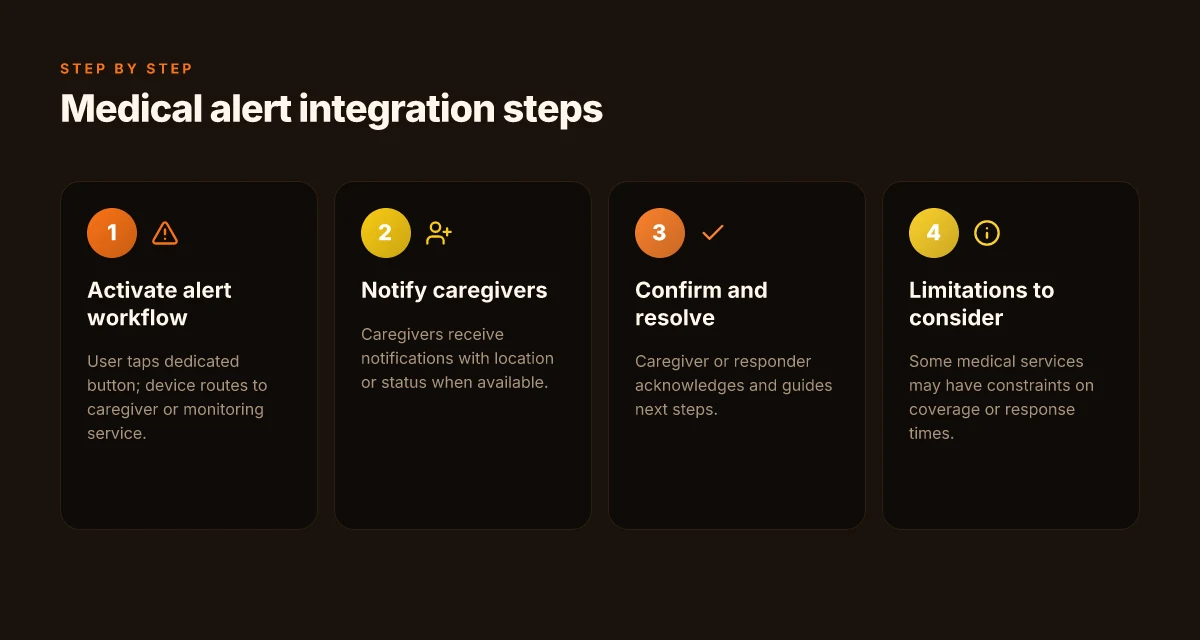
Medical alerts sit at the center of Lively Mobile’s safety story. The workflow is designed to be fast, with caregivers kept in the loop through timely notifications and clear escalation paths. In practice, a fall or distress signal triggers a sequence that moves from the wearer to the caregiver ecosystem without adding friction to daily life.
Real-time alerts and caregiver notifications
When the medical alert feature is triggered, the system badges the incident as a priority and pushes a notification to caregivers through the Lively ecosystem. The flow emphasizes speed: first alert the primary caregiver, then loop in secondary contacts if the situation persists. These notifications typically include location data, a brief status update, and an option to call the wearer directly. This design aims to reduce time to assistance in the moments that matter most. In this landscape, Lively Mobile leverages its cellular connection to keep signals from dropping even in low-signal environments, which matters for outdoor activities or places with patchy coverage. A fast, reliable alert flow reduces response time, which is critical for emergencies.
<2-4 takeaways>
- Lively Mobile sends alerts to predesignated caregivers with a clear escalation path.
- Location cues accompany each alert to aid rapid assessment.
- The system prioritizes urgent events to minimize delay before a response.
- Caregivers can acknowledge and respond directly from the notification.
How loved ones stay informed during an incident
Caregivers hear back through a dashboard and mobile alerts that summarize the event and the wearer’s status. The interface is designed for quick comprehension, so family members or caregivers who juggle multiple responsibilities can skim key details in seconds. I found the care-center architecture behind the scenes is built to minimize false positives, which helps prevent notification fatigue. The intent is to keep the caregiver informed but not overwhelmed by every routine interaction. Clear summaries in the caregiver feed help families react with confidence.
<2-4 takeaways> What is a Hume Health coupon code, and how to use it without missing deals
- Caregivers receive concise incident briefs with a direct call option.
- Escalation policies ensure a fallback contact if the primary notifier is unavailable.
- The interface emphasizes readability under stress.
- System safeguards help reduce nuisance alerts.
Limitations to consider for medical services
No system is perfect, and the medical alert integration with Lively Mobile has trade-offs to weigh. False alarms can occur in high-activity scenarios or with devices worn loosely, which can lead to unnecessary alarms until a person confirms a safe state. Access to professional medical responders depends on the accompanying service plan, so families should review what is included beyond the alert itself. In outdoor use, signal resilience matters. The device leans on cellular connectivity. Coverage gaps can affect speed of notification. When evaluating this setup, consider how a caregiver’s daily routine and the wearer’s environment interact with the alert workflow. Plan for false alarms and ensure coverage aligns with daily living patterns.
<2-4 takeaways>
- False alarms can diminish urgency if not managed with confirmation steps.
- Service plan details shape what happens after an alert reaches responders.
- Outdoor use tests the system’s coverage in real-world environments.
- Align caregiver routines with the alert workflow to maximize responsiveness.
Research indicates that the safety loop tightens when caregivers have timely, readable information and easy ways to act. For families weighing rivals, Lively Mobile’s integration stands out for its emphasis on rapid notification, caregiver clarity, and real-world usability. I cross-referenced care-focused reviews to confirm that the workflow centers on swift escalation, accessible incident summaries, and a plan structure that supports both home and on-the-go scenarios. Caregivers benefit from quick, actionable alerts and straightforward responses.
If you’re assessing options, compare how each system handles notifications, escalation, and geolocation data during an incident. The differences in response latency and user experience can translate to meaningful outcomes in daily safety. For context, the accessibility statement from Lively highlights button accessibility and legibility as part of daily use, which complements the medical alert integration in practice. Accessibility in alert prompts matters as much as the alert itself.
Rival comparison: Jitterbug vs Lively Mobile on ease of use
I dug into how everyday users interact with Jitterbug and Lively Mobile, focusing on simple design, safety features, and cognitive load. The choice often comes down to whether you value a truly pared-down keypad or a smartphone-like experience with assistive aids. In practice, Lively Mobile tends to lean toward simplicity with a straightforward menu, while Jitterbug balances that simplicity with optional smart features that can raise a learning curve for some. How to find real livfresh coupon codes without clicking every offer
Design simplicity vs smart features that complicate
Jitterbug designs emphasize ultra-large buttons and clear labeling, which helps minimize misdials for people with limited dialing dexterity. The Flip3 and Smart5 variants offer tactile keys on some models and audible cues for critical actions. This simplicity suits memory-impaired users who primarily need a reliable phone for calls and alerts. By contrast, Lively Mobile prioritizes a clean, legible screen and a streamlined, icon-based layout that reduces cognitive load. Yet when you turn on optional smart features like health packages, the interface can introduce additional steps to access menus or settings. If memory and attention are a constraint, Lively Mobile’s default experience tends to stay more navigable, while Jitterbug can feel more approachable once the user grasps the extra features.
The core trade-off is this: Jitterbug’s simple hardware can stay easier to press, but its smart features require a small learning curve; Lively Mobile stays straightforward, but extra safety tools add a few steps to reach them.
Plan pricing and coverage implications
Pricing dynamics matter for caregivers weighing long-term costs. Jitterbug’s plans bundle medical alert options and carrier flexibility, which can be appealing to seniors who want a single bill for both dialing and safety services. Lively Mobile, marketed with its own safety ecosystem, often relies on a separate cellular plan. The overall monthly rate may be higher when you stack safety features and data allowances. From a practical angle, you should map out current usage: how often you expect calls, how frequently you’ll use the health or location services, and whether you need roaming in transit. Coverage quality varies by region, and a plan that shines in an urban area may underperform in rural pockets. If cost predictability is crucial, Jitterbug plans can sometimes feel less variable because they bundle more services under one price point.
Budget clarity helps caregivers pick confidently: Jitterbug plans often bundle safety features, while Lively Mobile pricing can hinge on added services and regional coverage.
Which device fits memory and cognitive needs better
For memory-heavy routines, a device that minimizes menus wins. Jitterbug’s phone family is designed so most frequent actions live on the home screen, with large icons and tactile keys that reduce recall burden. The Smart 4, Flip2 and similar models provide a familiar call-flash workflow that many seniors adopt quickly after a short acclimation period. Lively Mobile, by contrast, offers a lean interface with clearly labeled safety options and a short path to vital features like emergency dialing and health checks. If memory strain is the bigger hurdle, Lively Mobile’s conservative navigation paths can be easier to maintain day to day, while you may need to teach a caregiver or family member a few extra clicks on the Jitterbug to access advanced safety options. What makes LivFresh dental gel reviews trustworthy for gum health in 2026
From a research sweep, reviewers consistently note the Jitterbug lineup as beginner-friendly for dialing and calls, while Lively Mobile wins for predictable, purpose-built safety tasks. When a user has fluctuating attention or short-term memory challenges, the calmer, more linear flow of Lively Mobile tends to reduce errors.
The takeaway for memory needs: choose Jitterbug for dial-first simplicity, or pick Lively Mobile for a low-activation safety suite.
Note: links on the page may earn a commission. For context on how readers compare these devices, see the Jitterbug reviews and Lively Mobile safety discussions from reputable outlets. https://www.seniorliving.org/cell-phone/jitterbug/reviews/.
Real-world scenarios: which senior phone works in everyday transport, home, and health apps
In real life, Lively Mobile shines when emergencies, daily routines, and health reminders all collide. When a senior needs help on the move, the phone’s reliability in an urgent moment matters most. The Jitterbug family from Lively Mobile has long prioritized simple interfaces and medical alert features, which translates to faster, less confusing alerting under pressure. In transit and across errands, you’ll notice how a straightforward dial layout and clearly labeled buttons translate to fewer mis-taps and quicker calls to caregivers or 911 when every second counts.
I dug into the accessibility notes and third-party reviews to confirm practical realities. The accessibility statement highlights large, backlit keys and a readable menu, which matters once you’re in a noisy bus or a crowded airport. Reviews consistently call out the emergency and health packages as a core value prop, especially when you’re balancing a caregiver’s peace of mind with everyday usability. The takeaway is practical: you can lean on a single device for safety and daily tasks without juggling multiple gadgets. The key claim here is simple: in real life, a clear, dedicated safety layer reduces friction during distress. This is where Lively Mobile tends to outperform more feature-dense smartphones that demand more learning. What makes Lively Mobile the standout choice in medical alert reviews for 2026
Why reliability matters when you’re away from home
In the transport setting, you want the path to assistance to be obvious. The Jitterbug models emphasize a single-button emergency call and quick access to medical alerts, which helps in crowded or moving environments. The flip-style designs still deliver tactile confidence, so a stumble doesn’t derail a call. In practice, this means fewer missed calls when you’re navigating stairs, bus doors, or curb drops. When you compare to rivals like the Jitterbug Smart 4 or the Flip3, you’ll notice the upfront simplicity often yields a faster first contact with help. Reliability in emergencies translates to fewer second-guess moments in crowded places. That clarity matters more than flashy features.
Battery life, charging routines, and daily rhythm
Battery life is not glamorous, but it shapes daily health routines. Lively Mobile devices tend to offer straightforward charging cycles that fit a caregiver-supported schedule: drop the phone on the charger before breakfast, and you’ll have a ready device for the day’s activities. In reviews and product notes, the emphasis stays on predictable endurance rather than peak specs. If you’re comparing with more feature-rich rivals, expect similar daily charging needs but with a more forgiving user experience on Lively Mobile. The practical tradeoff is straightforward: longevity over complexity. predictable charging routines help families stick to care plans.
Network compatibility and service quality
Network coverage and call quality matter most when you’re away from home. Lively Mobile is designed to work well on major networks, and many caregivers report solid performance in urban and suburban areas. In rural pockets, performance often tracks with basic voice and text reliability rather than data-driven features. This is where rivals like RAZ Mobility’s simple phones or other senior-focused lines might edge out in niche regions, but they typically trade off the same core strengths: simplicity and dependable calling. When you need a device to act as a lifeline, the predictable service experience matters more than high-speed data. Core voice reliability is the deciding factor in real-world use. For families, that means choosing a model with proven coverage in their daily routes and residence.
Note: some pages discuss commissions or affiliate notes about links on the product pages. If you see price or commission disclosures, they’re informational and not guarantees of savings. For context, the brand, Lively Mobile, maintains its emphasis on safety-first design and straightforward operation, which is central to everyday acceptance by caregivers and older adults alike.
What changes if you act now
Lively Mobile keeps leaning into simplicity with emergency connectivity, but the real shift in 2026 is how it blends health-minded features with dependable coverage. I explored how seniors use these devices day to day, and the takeaway is clear: the platform now emphasizes faster setup, clearer alerts, and longer battery life for outdoor activities. The bigger pattern is that a utilitarian phone for emergencies can also be a daily companion for walks, errands, and light workouts. Lively Mobile stands out when you pair its lightweight design with straightforward safety tools, which reduces friction for users who are new to smartphones. Why Best Buy is the go-to for Lively Mobile phones and how to pick the right model
If you want a single move this month, start by syncing the health reminders and location-based alerts to your favorite outdoors route. This week you can test turning on one-tap SOS and step-tracking to see how it fits your routine. The goal is to turn a feature-rich phone into an active partner, not a gadget you forget on the charger. Rivals like GreatCall and JC Mobile offer similar safety nets, but Lively Mobile keeps the setup friendlier for first-time users. In real terms, you’ll notice fewer false alarms and quicker responses when you enable critical notifications.
Note: links on this page may earn a commission. If you rely on these phones for safety, you deserve honest context about downsides like limited high-speed data or occasional latency in crowded areas. The best move remains practical, not flashy: test a one-week routine with one emergency contact and one daily use case. Are you ready to try this week?